The P2P merchant survival guide
Accept a transaction hash and never a screenshot, open the explorer on a domain you typed yourself, match the full contract address, wait for your confirmation threshold, check the sender wallet's age and gas balance, and never refund an unverified deposit — the refund request is the payload, not a de-escalation.
If you pay out rupees against incoming USDT, you are the target. Not the exchange, not the buyer — you.
The five non-negotiables
- 1Hash or nothing. No screenshot is ever proof — not one with a bank logo, not one showing “Completed”, not a screen recording. A transaction hash is the only artefact you accept, because it is the only one you can independently verify.
- 2You navigate to the explorer. Type
bscscan.comyourself. Cloned explorers exist specifically to defeat merchants who follow rule 1 but not rule 2. - 3Match the contract address, not the token name. Compare the middle characters — vanity addresses match the first and last four on purpose.
- 4Confirmations before rupees. 15+ on BNB Chain, 12+ on Ethereum, 19+ on Tron. A pending transaction can be dropped after you have paid.
- 5Never refund an unverified deposit. The refund request is not a de-escalation — it is the payload.
The payout SOP, step by step
| # | Step | Stop if… |
|---|---|---|
| 1 | Receive the claim of payment | They lead with urgency or abuse |
| 2 | Request the transaction hash | They send a screenshot instead, twice |
| 3 | Open your own explorer, paste the hash | Hash not found, or on a different chain |
| 4 | Click through to the token contract | Any impersonation or Suspicious banner |
| 5 | Character-match the contract address | Any mismatch, anywhere in the string |
| 6 | Check amount and decimals | Amount off, or scale looks absurd |
| 7 | Check confirmation count | Under your threshold — wait, do not pay |
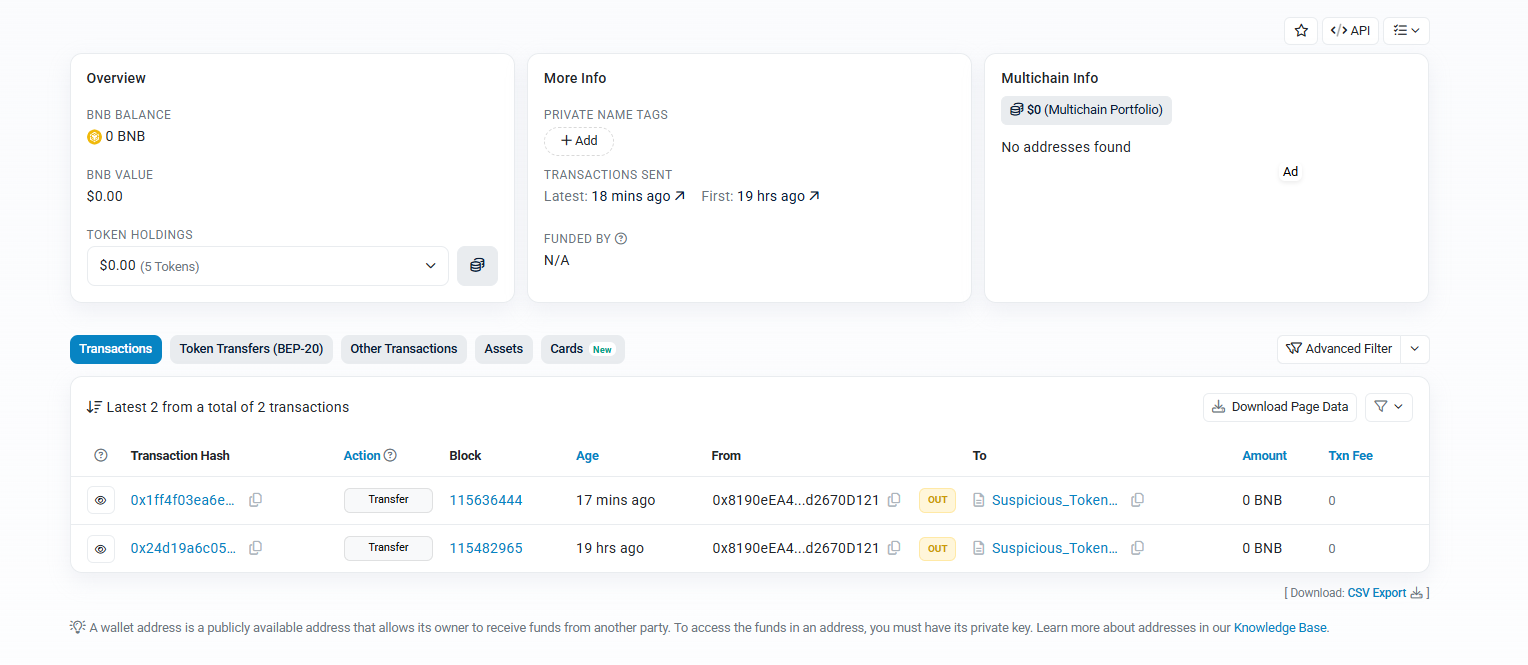
| 8 | Check sender wallet age and gas balance | Burner: 0 gas, no funding source, no history |
| 9 | Confirm it is spendable | It will not move to an exchange |
| 10 | Release the fiat | — |
Step 8 deserves emphasis. In the case we published, the sender's wallet held 0 BNB, was 19 hours old, had made exactly two transactions in its life, and had never received a single genuine USDT. Burner wallets are not subtle once you look.
The social-engineering half
The technical checks are the easy part. The pressure is what actually breaks merchants, and it follows a script you can learn to recognise.
| What they say | What it means | Your response |
|---|---|---|
| “Payment done, send fast, I'm in a hurry” | Compressing your verification window | “Verification takes two minutes. Every time.” |
| “Here's the screenshot, check it” | Substituting an unverifiable artefact | “Screenshots aren't accepted. Send the hash.” |
| “App scammer ho” / public accusation | Reputation pressure to force a payout | Stay factual. Post the chain data if needed. |
| “Check on this link” | Steering you to a cloned explorer | Use your own bookmark. Always. |
| “Fine, no payment, just return my USDT” | The actual objective | Never refund an unverified deposit. |
| “I'll pay you extra for the trouble” | Above-market rate as bait | Nobody overpays for a public commodity. |
Do not forget the fiat side
- Reversed or disputed transfers. Payment lands, you release the USDT, then it is reversed or reported. Confirm settled credit in your account — not an SMS, not a UTR screenshot.
- Third-party payments. If the sender's name does not match the verified trader, refuse. Third-party money is frequently stolen money, and the account it lands in gets frozen.
- Edited UTR screenshots. Same problem as crypto screenshots. Check your own bank statement, not their image.
- Mule accounts. Accepting funds from a mule can freeze your account for months even though you did nothing wrong.
If you have already been hit
- 1Stop all payouts to that counterparty immediately — including any “partial refund to settle this”.
- 2Preserve everything: transaction hashes, contract address, wallet addresses, full chat export with timestamps, UPI and bank identifiers.
- 3Report the token on the explorer. This is how counterfeits get flagged for the next merchant.
- 4File formally. How to report a crypto scam in India.
- 5Publish the indicators. Wallet and contract addresses are not private data — sharing them is how the next desk avoids the loss.
This SOP works, but it depends on you executing ten steps perfectly, every time, forever. FastXP2P enforces the same logic in code — contract-address allowlisting, confirmation depth, dual escrow, KYC-verified counterparties and a dispute desk that reads chain data instead of screenshots.
Become a verified merchantFrequently asked questions
Is a wallet screenshot ever acceptable proof of payment?
No. A screenshot is an image file that can be edited in seconds, and a genuine screenshot of a counterfeit token looks identical to one of real USDT. Only a transaction hash you verify yourself on an explorer counts.
A buyer is publicly calling me a scammer. What should I do?
Stay factual and do not pay to make it stop. Public accusation is the pressure phase of a scripted attack. Post the on-chain data — the contract address and explorer warning speak for themselves.
References
Primary sources for the rules and mechanics described above. Rules change — check the original before you act on anything here.
- 1National Cyber Crime Reporting PortalMinistry of Home Affairs, Government of India
- 2How Tether worksTether
- 3Tether reserves and transparency reportsTether
- 4Sanchar Saathi — report fraud communicationsDepartment of Telecommunications, Government of India
- P2P
- merchant
- playbook
- escrow